Creative Foundary
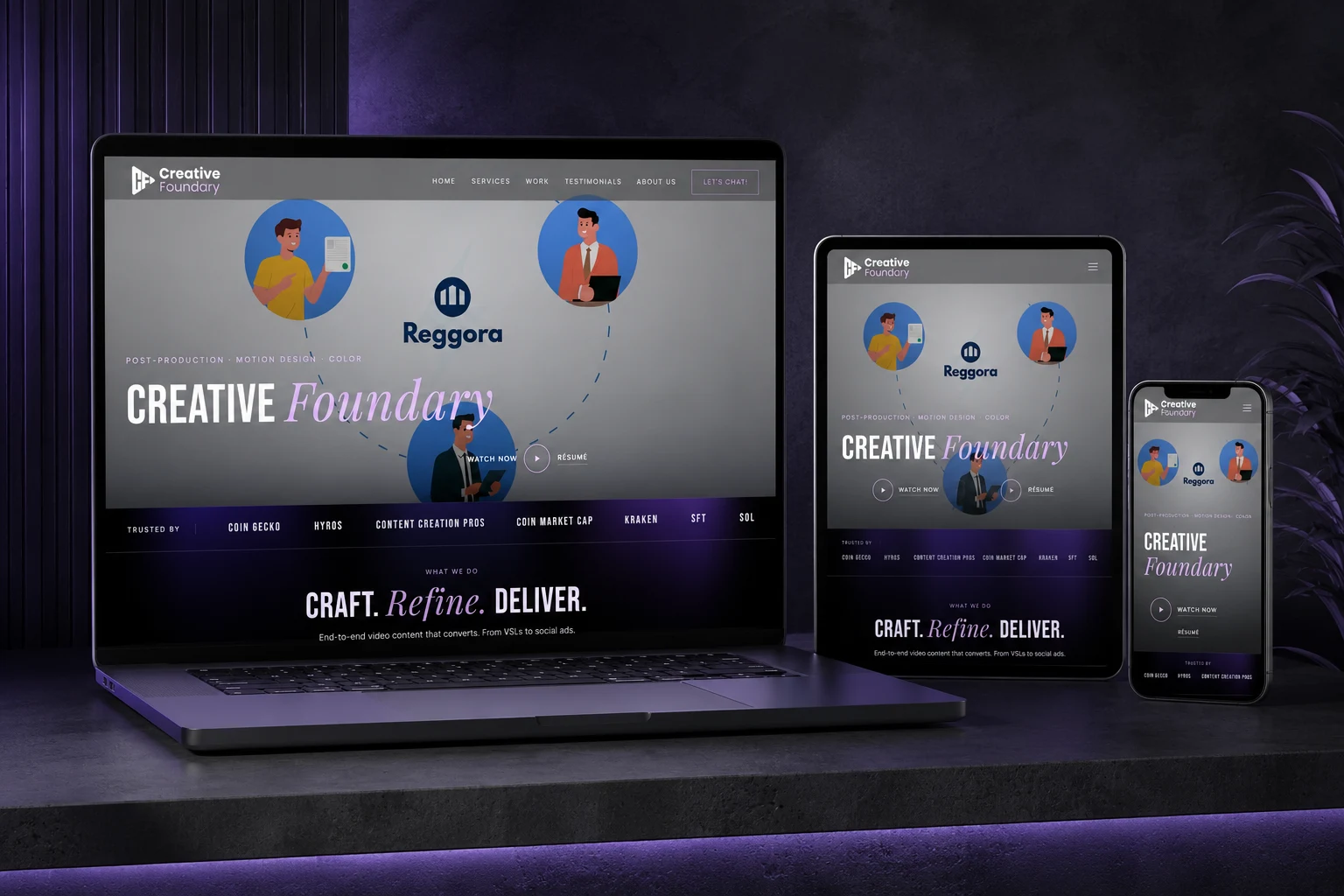
Every frame tells a story. A visual portfolio for a post-production and video content studio working across editing, motion design, colour, VSLs, social ads, SaaS explainers and short-form, designed so the work takes centre stage and everything else supports it.
Overview
01
A Portfolio Built Around the Work
For a video editor and content creator the portfolio is not supporting content. It is the product. Creative Foundary needed a digital experience that could communicate the quality of its work immediately, while still making the business easy to understand.
The website brings services, selected work, short-form reels, testimonials, studio information and project enquiries into one visual narrative. The experience starts with the work and lets everything else support it.
Challenge
02
Designing for People Who Already Communicate Through Video
The work had to do most of the talking, and still answer what a client needs to know.
Creative Foundary sells visual storytelling, so the website could not rely on long explanations to convince anyone. At the same time a potential client still needed to know what the studio does, what kind of videos it makes, who it has worked with, whether it can handle their project, and how to start. The challenge was balancing visual impact against clarity.
What the experience had to do
- Establish the quality and range of the studio's work immediately
- Make video feel native rather than an image dropped into a conventional grid
- Separate VSLs, editing, thumbnails, explainers and social ads clearly enough to choose between
- Reinforce trust through client logos, testimonials and selected work
- Give reels and short-form their own presentation, since they behave differently
- Offer a simple route from watching the work to starting a conversation
- Answer what the studio does without a wall of copy
- Show who the studio has worked with
- Keep the interface from competing with the content it exists to frame
Role
03
My Responsibilities
Designing the stage, not the performance.
UX & UI Design
Design the complete portfolio experience around clarity and visual storytelling, so the design supports the content rather than competing with it.
Art Direction
Establish a visual language that feels cinematic, creative and contemporary, enough personality to have a point of view, not so much that it takes the stage.
Portfolio & Service Structure
Organise the video work into categories a visitor can explore without feeling overwhelmed, and translate the studio's creative services into a structure that explains itself.
Presentation & Conversion
Design layouts and interactions that keep video the dominant element, hold up when the screen shrinks, and lead from discovering the work to contacting the studio.
Solution
04
Solution & Key Features
Let the work lead.
A Video-First Hero
Post-production, motion design and colour set the context before a visitor starts exploring. The hero does not explain everything; it creates enough curiosity to make someone watch.
Services With a Purpose
VSLs, high-retention editing, thumbnail design, SaaS explainers and social advertising, presented as parts of one creative capability rather than a generic list.
Selected Work
The centre of the experience. Instead of case studies explaining what the studio can do, a quick visual scan across projects and styles answers the only question that matters: can they make something like this for me?
Short-Form, Built Differently
Social ads, real estate content, AI-generated video and branded vertical work get their own space, closer to browsing a reel collection than scrolling an agency portfolio.
Social Proof
Client stories speaking to quality, turnaround, communication, performance and long-term collaboration, treated as project evidence rather than decorative quotes.
The Team, and a Direct Path
The people behind the cut, then a conversion flow that lets a visitor name what they need (editing, motion, explainers, social ads) and start the conversation without being walked through extra pages.
Process
05
Implementation Process
Design the experience around the content.
- 01
Understand
Start with the creative business: the types of work, the target clients, the services, the content formats, and the reasons someone would choose this studio over another.
- 02
Content Map
Organise what exists into services, selected work, short-form, testimonials, about and contact, so every kind of content has a purpose rather than a place.
- 03
Art Direction
Develop a visual language that is cinematic without being distracting. The interface needs personality; the videos need to remain the stars.
- 04
Experience & Video-First UI
Design the journey from first impression to portfolio to enquiry, with components built around how video behaves, thumbnails, previews, cards and galleries working together rather than crowding the page.
- 05
Responsive Design
A video portfolio that works on desktop cannot simply be scaled down, so the small-screen experience is designed rather than derived.
- 06
Refine
Read the whole thing as a potential client: can I understand the studio, find relevant work, see enough quality to trust it, and make contact quickly?
Benefits
06
Results & Benefits
A portfolio that sells through the work.
For Visitors
- The studio reads as video-first almost instantly.
- Work is easy to browse across formats and services.
- The right kind of production support is easy to identify.
- Short-form has its own place rather than being mixed in.
- A clear next step at every stage.
For the Studio
- Capability communicated without excessive explanation.
- Testimonials reinforcing what the portfolio already shows.
- Client logos and stories carrying the credibility.
- The team given a place after the work has earned attention.
- A short, direct route from interest to enquiry.
For the Work
- Video treated as native, not as an image in a grid.
- Each piece framed rather than decorated.
- Categories that let range show without clutter.
- An interface that stays out of the way.
- A presentation that holds up on a small screen.
Impact
07
What the Experience Set Out to Change
The outcomes the work was built to produce.
Immediate Visual Impact
A visitor understands this is a video-first creative studio almost instantly.
Stronger Portfolio Discovery
Work becomes easier to browse across different formats and services.
Clearer Positioning
The studio's capabilities come across without relying on explanation.
Better Service Discovery
A potential client can quickly identify the kind of production support they need.
Social Proof in Place
Testimonials and client stories reinforce the quality the portfolio shows.
Simple Conversion
The journey from discovering the work to starting a project is short and direct.
08
What a Client Can Do Before They Ask
Everything that happens before the first message is sent.
Explore the work
See finished projects rather than descriptions of them.
See the range
Different editing and production capabilities, side by side.
Understand the services
Tell VSLs, editing, thumbnails, explainers and social ads apart.
Read what clients experienced
Evidence of quality rather than a claim about it.
Start the conversation
Say what they need and begin, without hunting for a way in.
09
The Portfolio Became Part of the Pitch
One continuous story rather than a folder of finished videos.
- High-converting VSLs
- High-retention video editing
- Thumbnail design
- SaaS explainer videos
- Meta, Reel and TikTok ads
- Selected work
- Short-form reels and shorts
- Client testimonials
For a post-production studio the website should not feel like an administrative brochure; it should feel like another piece of creative work. It does not try to replace the work; it frames it, creating the environment in which the work can make the strongest possible impression.
Details
Show supporting detail (2)
10
The Content System
Every kind of content, and the job it does.
- Services
- Selected work
- Short form
- Testimonials
- About
- Contact
- Video-first
- Cinematic
- Responsive
11
Project Snapshot
The project at a glance.
| Category | Details |
|---|---|
| Project | Creative Foundary |
| Industry | Video Production / Post-Production |
| Business Model | Creative Studio |
| Website Type | Creative Portfolio |
| Primary Audience | Brands, Creators & Marketing Teams |
| Core Offering | Editing, Motion, VSL, Explainers & Social Ads |
| Project Focus | Showcase Work + Generate Enquiries |
| Role | UX / UI / Website Design |
FAQ
12
Frequently Asked Questions
The questions this project usually raises.
What is Creative Foundary?
A post-production and visual storytelling studio offering video editing, motion design, colour, VSLs, SaaS explainers, thumbnails and social advertising.
Why is the website so video-focused?
Because video is the product being sold. For a video editor or content creator, showing the work is more persuasive than describing it in paragraphs.
What was the main UX challenge?
Presenting a large amount of visual content without the experience becoming a random video gallery. The work needed structure, categorisation and a clear path toward enquiry.
Why is short-form separated from selected work?
Short-form video has a different viewing behaviour and format from longer portfolio pieces. Giving reels and shorts their own experience makes that work easier to browse and understand.
What makes this different from a typical portfolio?
It is not simply a gallery. It is structured as a creative sales experience: the work attracts, the services explain, the testimonials validate, and the contact flow converts.
Have something worth watching?
Your project deserves more than a folder of finished videos. It deserves a presentation that makes people stop, watch, and want to know what comes next.
Craft. Refine. Deliver.
Start a Project
Send me yourcomplicatedproblem.
- Full-time roles
- Freelance & consulting
- Remote friendly
- Replies within 24 hours